UE Rebuilder
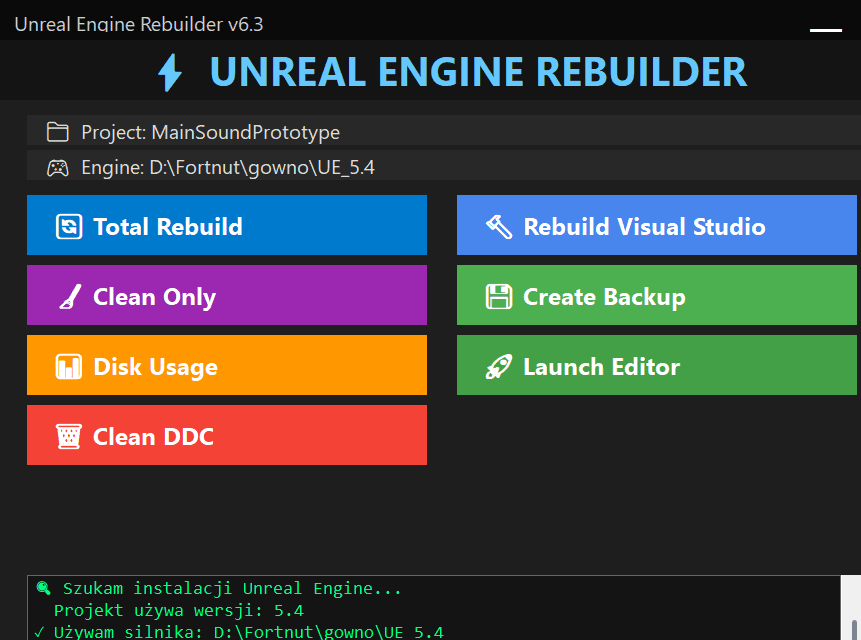
Unreal project caches go stale often enough to slow down iteration. This tool runs the cleanup and rebuild path in one guided flow.
Why This Exists
If you use Unreal long enough, you know the drill. Build worked yesterday, fails today. Unexpected linker errors. Stale caches pretending to be real data. Generated folders go stale often enough to slow down iteration.
The repair path I kept repeating was the same: delete Binaries, Intermediate, Saved, regenerate the VS solution, recompile from scratch. It takes about 15 minutes of clicking through folders, so I turned the repeated cleanup path into one guided button flow.
It also does something I wish Unreal did natively: shows you how much disk space each folder is eating. The DerivedDataCache alone grows to gigabytes if you do not watch it. The tool finds it and cleans it. Works on both UE 4.x and 5.x installs it can detect.
Features
Clean Rebuild
Deletes generated Binaries, Intermediate, and Saved folders. Regenerates the Visual Studio solution. Kicks off a full recompile. Full cleanup and rebuild, run from one guided flow.
Backups
Before it deletes generated folders, it archives Source, Config, Content, and Plugins with a timestamp. The cleanup is repeatable without putting project-critical folders at risk.
Disk Cleanup
Shows folder sizes before cleanup. The DerivedDataCache is usually the worst offender - it grows silently to gigabytes. One click clears it.
Auto-Detection
Checks standard install locations and detects the UE 4.x/5.x versions it can find. Standard install locations work without manually pointing the tool at the engine.
Logging
Timestamps every operation. If something goes sideways, you can read the log and see what happened, in order, with times.
Operation Log
Clean interface with a live console. Each rebuild step is visible, so shader cleanup, project-file generation, and launch errors are easier to debug.